Tenant Account
Main company data used across documents, dashboard, planning and billing.
Tenant Logo / Branding
Used on invoices, ACK, delivery notes and customer-facing documents.
Tenant Contact Details
Default contacts used by workflow and automatic emails.
Bank / Payment Details
Used on invoices and payment instructions.
Warehouse Settings
Configure warehouse handling and storage costs.
Handling In
Applied once when goods are received into the warehouse.
Handling Out
Applied once when goods leave the warehouse.
Storage
Storage tariff per cubic metre.
Repack
Repacking charge per colli.
QC Inspection
Quality inspection charge per colli.
Transport Settings
Configure depot, unloading rules, planning limits and transport costs.
1. Depot & Route Defaults
Default departure location and routing assumptions.
2. Delivery & Unloading Time
Calculate unloading time per delivery location. Multiple orders at one location are combined.
3. Planning Limits
Maximum route capacity, delivery stops, orders and working hours.
4. Transport Costs
Default cost assumptions used for route profitability.
Fleet & Carriers
Manage your own fleet and external carriers used for route planning and deliveries. Only active resources are visible in the route planner.
Emission Zones & Road Restrictions
Configure UK emission zone visibility, vehicle compliance checks and route planning alerts.
UK Emission Zones
Enable or disable individual zone alerts. The central geographic boundaries remain unchanged.
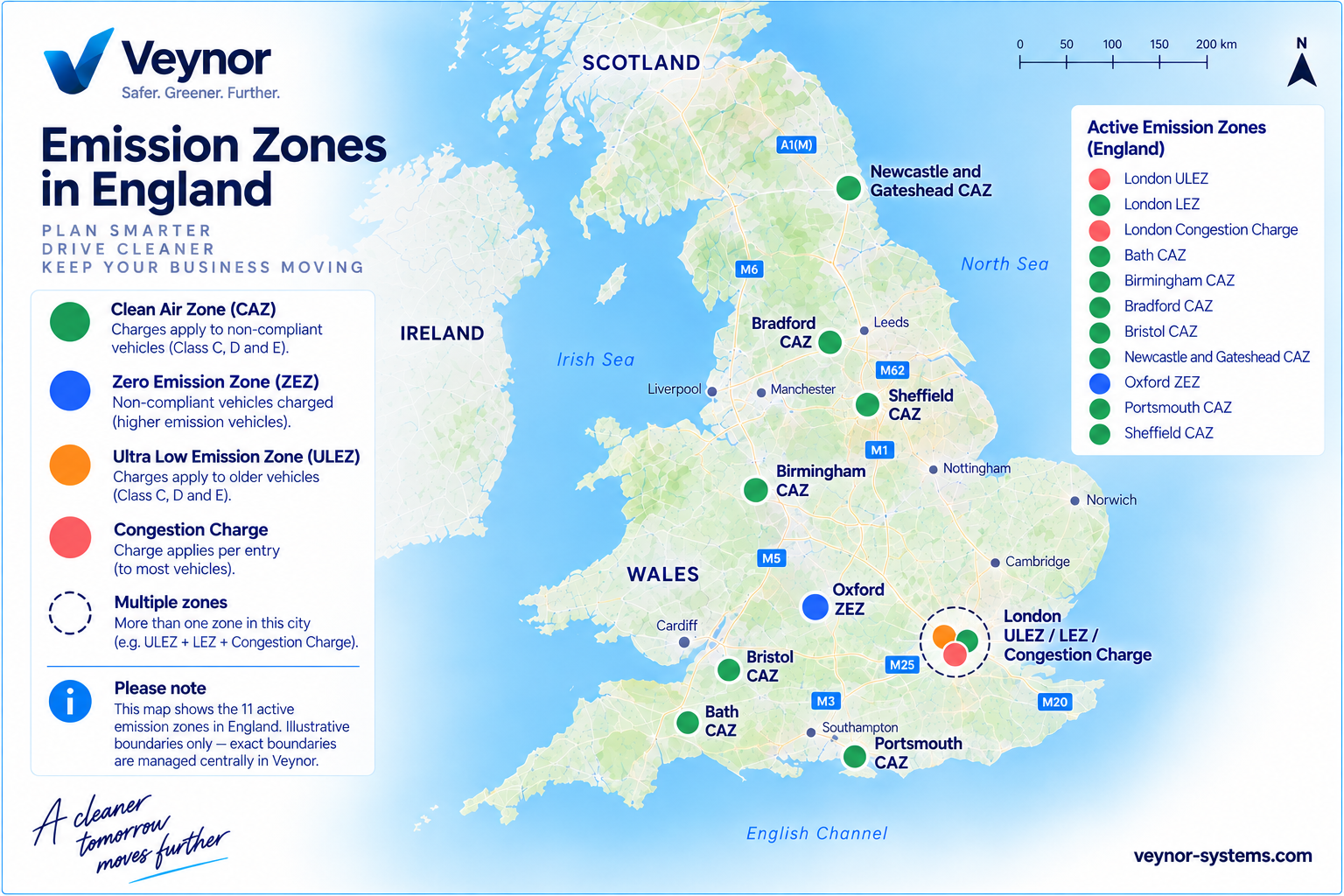
UK Emission Zones Overview
Nationwide emission zone reference map
View the illustrative overview of emission zones across England. Exact geographical boundaries are managed centrally in Veynor.
Personnel / Drivers
Driver accounts are loaded from user profiles. Drivers can be assigned to vehicles and later selected directly on route planning.
| Driver | Phone | Role | Default Vehicle | Use in Planning | Active | |
|---|---|---|---|---|---|---|
| Driver management will be connected in settings.js. | ||||||
Users & Access
Create portal users and assign roles securely.
| Name | Role | Product Owner | Retailer Code | Driver | Active | |
|---|---|---|---|---|---|---|
| No users loaded yet. | ||||||
Product Owners / Contract Customers
Manage product owners linked to your company. Products, invoices and operational flows are connected to these accounts.
Select product owner
Billing, documents and operational settings for the selected product owner.
Basic Information
Core details and identification for this product owner.
Product Owner Branding
Logo used on customer-facing documents.
Billing Configuration
Select which services are invoiced for this product owner.
Payment & Invoice Settings
Payment terms and invoice generation.
Pricing & Surcharges
Product owner-specific transport pricing and additional surcharges.
Pricing Document Notes
Text displayed on ACK and invoices.
Minimum Delivery Rules
Configure minimum delivery volumes, transport charges and approval rules.
Document Automation
Default automatic document generation for orders belonging to this product owner.
Contact & Communication
Email addresses used for invoices, acknowledgements, PODs and operations.
Communication Settings
How contact details are used throughout Veynor.
Primary address for invoice communication.
ACK EmailAddress used for order acknowledgements.
POD EmailAddress used for proof-of-delivery documents.
Operations EmailGeneral operational correspondence.
Product Owner Notes
Additional information and internal notes for this product owner.
Retailers / Delivery Shops
Retailers are delivery locations linked to product owners.
| Retailer Code | Retailer / Shop | Linked Product Owner | City | Postcode | Phone | Orders | Last Activity | ||
|---|---|---|---|---|---|---|---|---|---|
| Loading retailers... | |||||||||
Documents
Default document settings for ACK, invoices, delivery notes and POD.
General Pricing
Configure fuel surcharge, Ireland pricing and document notes.
Scotland Regional Pricing Zones
Configure postcode-based transport surcharges. Click the map to enlarge.
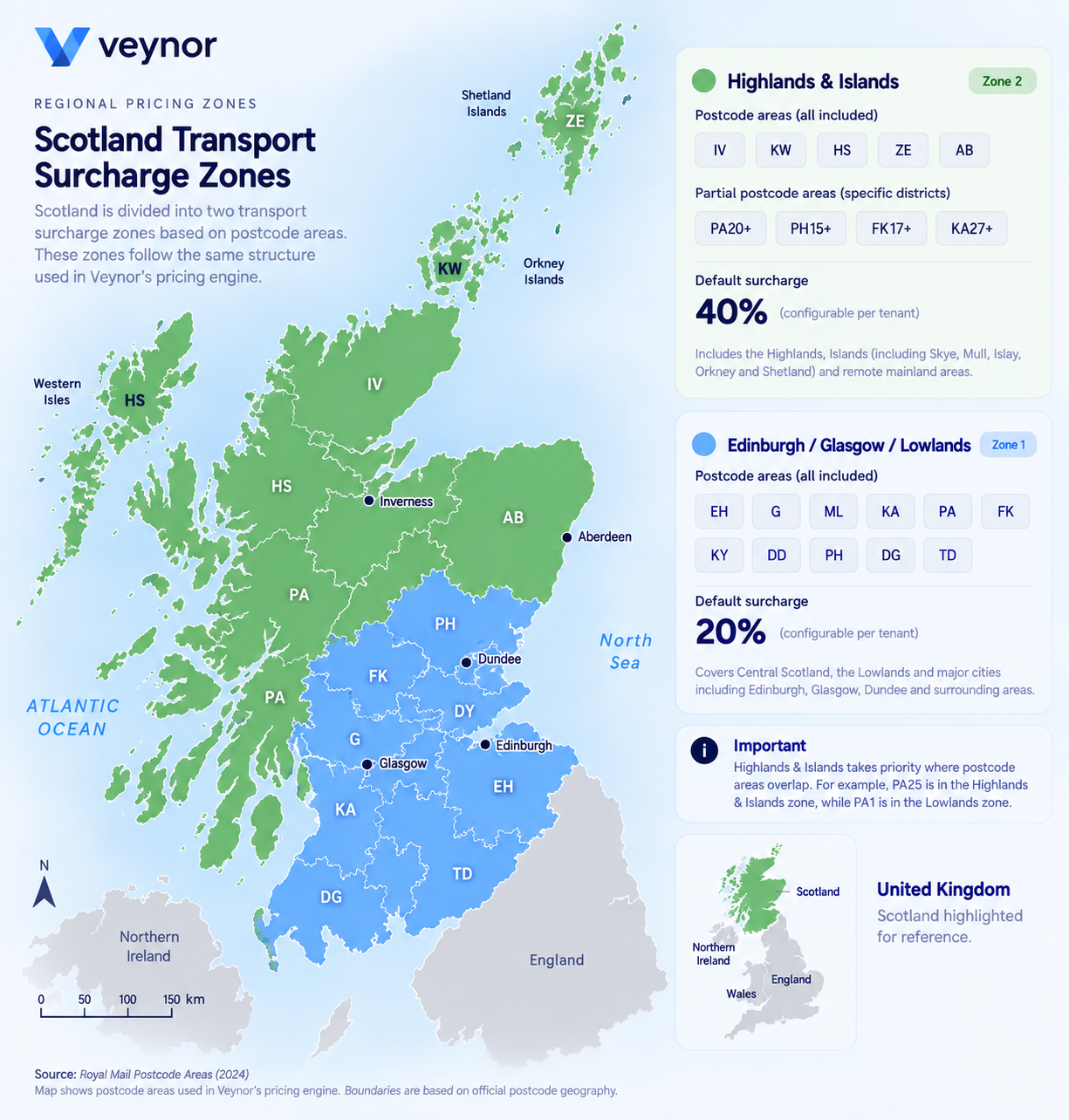 Illustrative regional pricing map.
Exact postcode classifications are determined
by the configured pricing rules.
Regional surcharges are calculated using the configured postcode zones.
The map is illustrative and does not determine the actual surcharge.
London Transport Charges
Configure ULEZ, LEZ and Congestion Charge customer charges.
 Illustrative ULEZ map.
For exact boundaries and vehicle eligibility,
refer to Transport for London.
View official ULEZ information ↗
These are tenant-configured customer charges. They are not necessarily the official TfL fees.
Automatic zone detection and vehicle eligibility must be implemented separately in the Pricing Engine.
Email Automation
Sender settings and automatic document email defaults.
System
Default import, product owner and country settings.